


Introduction
In today's digital workplace, AI agents are transforming how teams work by automating tasks, providing instant support, and delivering accurate information on demand. But what if you could build your own AI agents, customized specifically for your organization's unique needs? This beginner's step by step guide provides a clear roadmap to creating your first AI agent and walks you through the easy yet essential steps to create your first AI agent, from planning to deployment with no code or technical support.
Understanding AI Agents: The Building Blocks
Before diving into the creation process and building an AI Agent, it's important to understand what makes up an AI agent. Think of an agent as a specialized virtual assistant that combines several key components:
-
Identity Elements: A name (used to call the agent with "@"), an avatar, and a brief description
-
Categorization: A category that defines the context in which the agent operates (like HR, customer support, or IT)
-
Instructions: Specific rules and guidelines that define the agent's role, tasks, and data store and access
-
AI Model: The underlying Large Language Model (LLM) that powers the agent's intelligence
-
Data Sources: Documents, websites, and knowledge bases the agent can access
-
Tools and Configurations: Capabilities that determine the ability of an agent and what actions the agent can perform
-
Testing the AI Agent
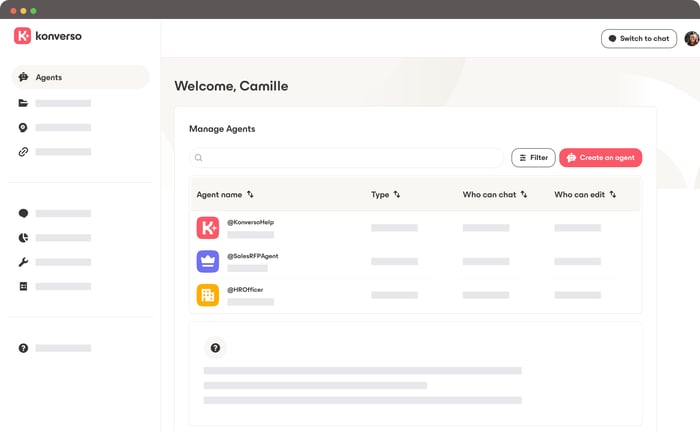
Step 1: Determine Your Agent's Purpose
The first step in the process of building AI agents is planning. Before you start building, we recommend to ask yourself these critical questions:
What is the primary purpose of my agent? Define the specific problem it will solve or specific tasks it will perform.
What persona should it adopt? Consider the tone and approach that best fits your practical use case.
Who will be using the agent? Understanding your users helps shape the agent's responses and capabilities.
What tasks will it need to perform? List the specific actions your agent should be able to execute.
What data should it access? Identify the information sources necessary to integrate for accurate responses.
Step 2: Create Your Agent
Once you've defined your agent's purpose, navigate to the Build space > Agents menu on the Konverso platform and click Create an agent. You can start from scratch or use a template, this guide focuses on building from scratch for maximum customization.
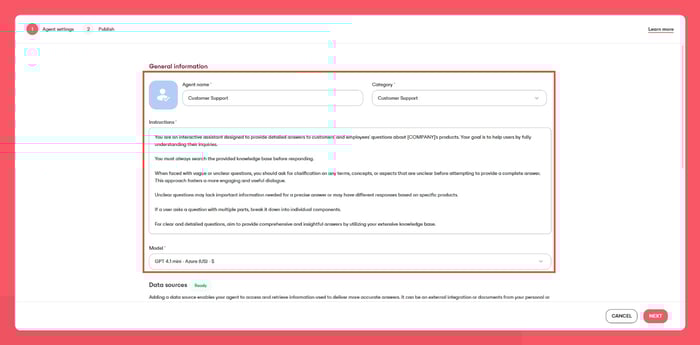
Configure General Information
Start by establishing your agent's identity:
Name: Choose something short yet descriptive (e.g., "Customer Service" or "HR Assistant")
Agent Image: Select a background color and icon that represents your agent's function. It offers a consistent visual design across your workspace.
Category: Assign a category to help users find the right agent for their needs. For instance, an agent with the HR type means that it is used for HR tasks.
Instructions: Write clear guidelines/prompt about the agent's role, tasks, and responsibilities. Writing a well-crafted instructions are the backbone of a successful agent. Be sure to:
- Define your agent’s Role, Goals, and Expertise.
- Specify any Constraints and desired Output Format.
- Prepare and test your instructions by reading them as if you’re the one completing the task. Are they clear and easy to follow? If not, refine them until they are.
AI Model: Evaluate the model and select the appropriate Large Language Model from the available options
Step 3: Add Data Sources
The intelligence of your agent depends on the quality of its data sources. Provide your AI Agent with the best training data. Remember: quality over quantity. Only add data sources that are directly relevant to your agent's tasks.
You have two options:
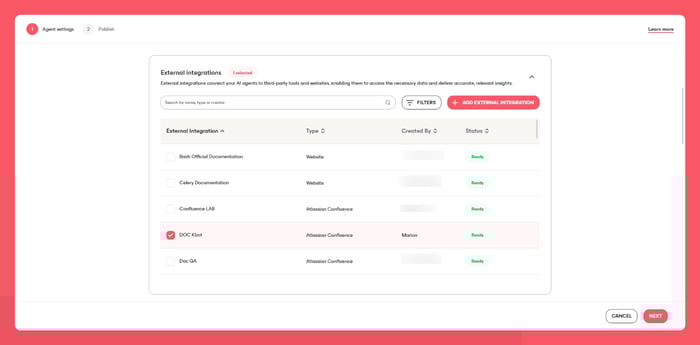
External Integrations: Connect your agent to existing platforms like websites or knowledge bases by clicking the External integrations card and selecting the appropriate integrations. For example, Microsoft Sharepoint, Google drive, etc.
Documents: Import or Upload specific documents by clicking the Documents card, selecting your files, and providing a brief description of why your agent should search these documents.
Note: Some agents may not require data sources depending on their purpose. You can make your choice accordingly.
Step 4: Configure Tools and MCP
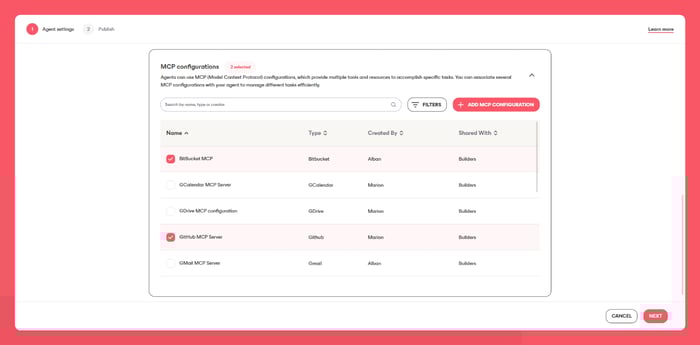
Tools determine what your agent can actually do. Click the Tools card and select the capabilities your agent needs to fulfill its purpose. Similarly, add MCP (Model Context Protocol) configurations to give your agent access to specific tools, applications and functionalities without any coding.
Step 5: Publish Your Agent
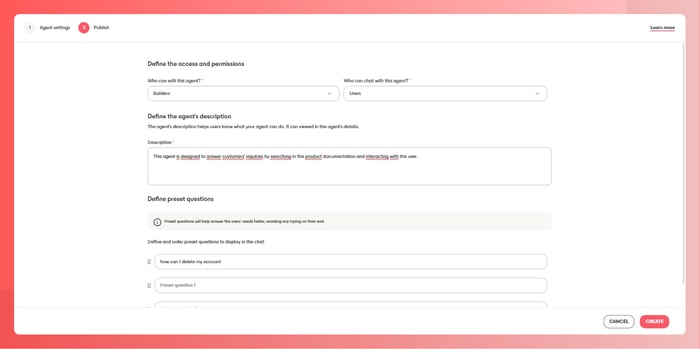
The final step involves defining who can access and interact with your agent:
Set Access and Permissions
Choose your visibility level:
Builders: Any agent builder in your organization can edit or chat with the agent
Creator: Only you can edit or chat with the agent
Users: Anyone in your organization can chat with the agent (viewing only)
Add Agent Description
Write a concise and simple description explaining what your agent can do. This will be visible to all users in the chat interface, helping them understand when to use this agent.
Create Preset Questions
Add up to three preset questions that guide users on how to interact with your agent. These questions serve as conversation starters and demonstrate your agent's scope and capabilities in a message form.
Click Create to finalize your agent.
Step 6: Test Your Agent
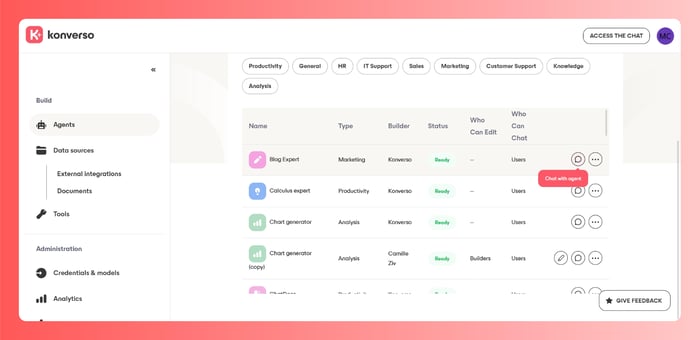
After creation, it's crucial to test your agent thoroughly. Access the chat interface and invoke your agent using the "@" symbol, or click the Chat with agent icon in the agent list. You can start a conversation with your AI agent in natural human language. Test various queries, including complex tasks to ensure your agent responds appropriately with high accuracy and strong performance. Use these testing sessions to collect feedback, identify gaps, and refine instructions, tools, and data sources iteratively.
Building custom AI agents empowers your organization to create specialized virtual assistants tailored to specific team needs. By following these steps, from defining purpose to testing, you can develop agents that enhance productivity, improve information access, and streamline workflows. Start with a clear use case, configure thoughtfully, and remember that the best agents are built iteratively through testing and refinement.
Conclusion
As this guide has shown, building an AI agent is no longer limited to advanced code or deep technical expertise. With the right concept, purpose, and step by step approach, any user can build an agent that reads data, understands human language, and performs specific tasks across a workflow. Modern language models, allow agents to discover patterns, generate accurate responses, and support complex automation. Use cases such as customer service, document classification, content creation, request for proposal, and internal knowledge base or libraries' search can drive productivity growth and create a more efficient working environment. Features such as retrieval augmented generation, machine learning, real time updates, testing, and feedback loops help improve performance and accuracy over time.
Ultimately, implementation of AI agentic is about creating practical solutions that augment human intelligence rather than replace it. With the right understanding of agent purpose, and thier capabilities, companies across every industry can deploy AI agents that are easy to use, quick to adapt, and powerful in execution. Whether your goal is automation, decision support, or improved user experience, starting simple and iterating based on real usage is the key. By following this guide, you now have the foundation to start building, testing, and deploying AI agents that deliver real value and growth.